Mailchimp Dynamics CRM Integration: How to Connect Mailchimp With Dynamics 365
Modern marketing teams rely heavily on customer data. But what happens when that data is stored in Microsoft Dynamics 365 CRM while email campaigns are managed in Mailchimp?
For many businesses, the result is disconnected data, repeated CSV exports, manually maintained contact lists, and limited visibility into marketing engagement.

This is one of the main reasons organizations explore Mailchimp Dynamics CRM integration.
Connecting Mailchimp with Dynamics 365 can help businesses bring CRM data and email marketing activities closer together. Instead of treating customer information and campaign activity as separate processes, an integration can create a more connected workflow for marketing and sales teams.
But how does the integration actually work? What information should be synchronized? And what should businesses look for when choosing a Dynamics CRM Mailchimp connector?
Let's explore.
What Is Mailchimp Dynamics CRM Integration?
Mailchimp Dynamics CRM integration is the process of connecting Microsoft Dynamics 365 CRM with Mailchimp so that relevant customer, contact, audience, campaign, and engagement information can be exchanged between the two platforms.
The platforms serve different purposes.
Microsoft Dynamics 365 CRM is primarily used for managing:
Leads
Contacts
Accounts
Opportunities
Customer relationships
Sales activities
Business data
Mailchimp focuses primarily on:
Email marketing
Audiences
Campaigns
Subscribers
Segmentation
Marketing engagement
When these platforms operate independently, marketers often have to manually transfer data between them.
Integration provides a way to connect the two systems according to predefined business rules.
A typical workflow might look like this:
Dynamics 365 CRM
↓
Customer & Prospect Data
↓
Audience Segmentation
↓
Mailchimp
↓
Email Campaign
↓
Engagement Data
↓
Dynamics 365 CRM
The objective is not simply to transfer information.
The objective is to make customer information more useful throughout the marketing and sales process.
Why Integrate Mailchimp With Dynamics 365?
Consider a business with thousands of contacts in Dynamics 365.
The marketing team wants to send a campaign to customers in a particular industry who have shown interest in a specific product.
Without integration, someone may need to:
Export CRM records.
Filter the records.
Clean the spreadsheet.
Import the contacts into Mailchimp.
Create the campaign.
Send the campaign.
Review engagement separately.
Manually communicate useful information back to sales.
This workflow might work occasionally, but it becomes difficult to maintain when campaigns are frequent.

Businesses that integrate Mailchimp Dynamics CRM can reduce some of this manual work and create a more structured connection between their CRM and marketing processes.
7 Reasons Businesses Use Mailchimp Dynamics CRM Integration
1. Reduce Manual Data Transfer
Repeatedly exporting and importing contact lists can consume valuable marketing time.
An integration can automate relevant synchronization activities and reduce dependence on spreadsheets.
Instead of repeatedly preparing lists, marketing teams can focus more on campaign planning, content, segmentation, and analysis.
2. Improve Audience Segmentation
CRM data can provide valuable information for creating targeted audiences.
For example, businesses may want to create separate audiences for:
Existing customers
New prospects
Qualified leads
Open opportunities
Specific industries
Geographic regions
Product interests
Customer lifecycle stages
The more relevant the audience, the easier it becomes to create messaging that matches the recipient's situation.
3. Connect Marketing and Sales
Marketing and sales often work with the same customers but view them through different systems.
Marketing sees campaign activity.
Sales sees customer relationships and opportunities.
A Dynamics CRM Mailchimp integration can help bring relevant information from these activities closer together.
For example, campaign engagement can provide sales representatives with additional context when following up with prospects.
4. Improve Data Consistency
Customer information changes constantly.
Contacts change jobs. Email addresses change. Prospects become customers. Opportunities move through different stages.
When information is maintained separately in two systems, discrepancies can develop.
A structured synchronization process can help reduce inconsistencies between CRM and marketing databases.
5. Reduce Spreadsheet Dependency
Spreadsheets are useful for many business activities, but repeatedly using them as a bridge between CRM and marketing platforms can introduce unnecessary manual work.
As databases grow, this process becomes increasingly difficult to control.
A connected system can provide a more scalable alternative.
6. Improve Campaign Targeting
CRM data can provide information that helps marketers understand their audience.
For example:
Is this person a prospect or customer?
Which industry do they belong to?
Are they associated with an open opportunity?
Which product are they interested in?
Where are they in the customer lifecycle?
These questions can influence the type of campaign a contact should receive.
7. Create Better Marketing Visibility
Email engagement can provide additional information about customer interactions.
Depending on the integration solution, activities such as campaign participation, opens, and clicks can potentially be connected to CRM records.
This can help create a broader view of the customer journey.
What Can Be Synchronized Between Mailchimp and Dynamics 365?
Before businesses integrate Mailchimp Dynamics 365, they should determine what information actually needs to move between the platforms.
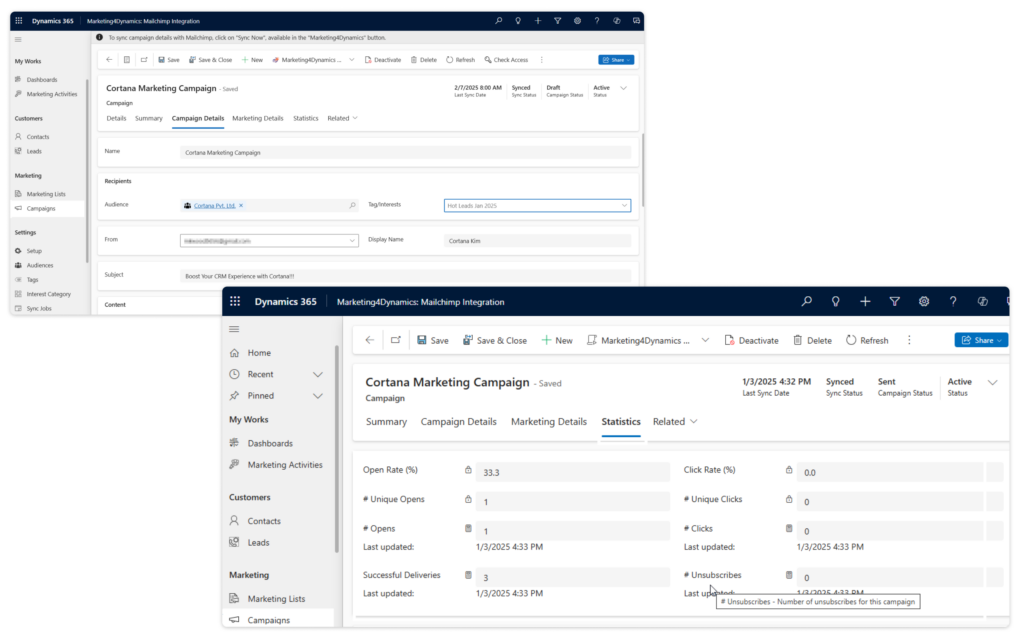
Potential data categories can include:
| Information | Potential Purpose |
|---|---|
| Contacts | Email audiences |
| Leads | Lead nurturing |
| Accounts | Customer segmentation |
| Audiences | Marketing organization |
| Segments | Targeted campaigns |
| Tags | Contact categorization |
| Interests | Audience targeting |
| Campaigns | Marketing management |
| Opens | Engagement analysis |
| Clicks | Engagement analysis |
| Unsubscribes | Preference management |
The exact capabilities depend on the integration solution and the organization's configuration.
The goal should not be to synchronize everything.
Instead, synchronize the information that has a clear business purpose.
How to Integrate Mailchimp Dynamics 365 CRM
Businesses searching for ways to integrate Mailchimp Dynamics CRM should approach the project in stages.
Step 1: Review the CRM Data
Start by understanding what information exists in Dynamics 365.
Look for:
Duplicate contacts
Incomplete records
Invalid email addresses
Outdated information
Incorrect segmentation data
Integration should ideally begin with clean data.
Step 2: Define Marketing Audiences
Determine which CRM records should participate in email marketing.
For example:
Customers → Customer campaigns
Leads → Nurturing campaigns
Open opportunities → Sales-support campaigns
Industry groups → Industry-specific campaigns
This makes the integration strategy business-driven rather than technology-driven.
Step 3: Define Synchronization Rules
Decide which information should flow:
Dynamics 365 → Mailchimp
and which information should flow:
Mailchimp → Dynamics 365
Not every field needs to move in both directions.
Step 4: Select a Connector
This is where a Dynamics CRM Mailchimp connector becomes important.
Evaluate the available solutions based on:
Synchronization capabilities
Two-way synchronization
Audience management
Segmentation
Campaign management
Engagement tracking
Scalability
Data governance
Microsoft Dynamics compatibility
Step 5: Test Before Scaling
Don't immediately synchronize the entire database.
Start with a controlled group of records.
Check:
Field mapping
Contact creation
Updates
Audience assignment
Campaign data
Engagement information
Once the workflow is validated, expand it.
What Is a Dynamics CRM Mailchimp Connector?
A Dynamics CRM Mailchimp connector acts as the bridge between Microsoft Dynamics 365 CRM and Mailchimp.
However, connectors can differ significantly in functionality.
Some solutions may focus primarily on contact synchronization.
More comprehensive solutions may provide capabilities around:
Contacts
Leads
Audiences
Segments
Tags
Interests
Campaigns
Campaign engagement
Two-way synchronization
CRM-based marketing activities
Therefore, businesses should compare functionality instead of selecting a connector solely because it supports the two platforms.
Mailchimp Dynamics CRM Integration vs. Manual Import
For businesses still transferring data manually, the difference can be significant.
| Manual Approach | Integrated Approach |
|---|---|
| Export contacts | Synchronize relevant records |
| Modify spreadsheets | Apply synchronization rules |
| Import into Mailchimp | Maintain connected data |
| Manage campaigns separately | Connect campaign information |
| Review engagement separately | Potentially connect engagement |
| Repeat the process | Use repeatable workflows |
For occasional campaigns and small databases, manual processes may be manageable.
For larger organizations running frequent campaigns, integration can become much more valuable.
How Can Mailchimp and Dynamics 365 Improve Marketing Segmentation?
Segmentation is one of the strongest reasons to connect CRM and email marketing data.
Imagine a company selling enterprise software.
Its CRM contains contacts from:
Healthcare
Financial services
Manufacturing
Retail
Professional services
Instead of sending one generic email, marketing could create industry-specific campaigns.
For example:
Healthcare
Focus on compliance, efficiency, and patient-related workflows.
Manufacturing
Focus on operational efficiency and process automation.
Financial Services
Focus on security, reporting, and customer management.
The technology doesn't create the strategy by itself.
The CRM data simply gives marketers more information with which to build the strategy.
What Should You Look for When Choosing a Mailchimp Dynamics CRM Solution?
Before selecting a solution, ask several important questions.
Does it support two-way synchronization?
If your business needs data to move in both directions, verify this capability.
Can synchronization be controlled?
You may not want every CRM contact automatically added to a marketing audience.
Does it support segmentation?
Check whether the solution works with the audience structures your marketing team actually uses.
Can campaign activity be connected with CRM?
Campaign engagement can become useful when sales teams can access relevant information.
Does it work with your Dynamics 365 environment?
Compatibility should be verified against the specific Microsoft environment used by your organization.
Can the solution scale?
Consider future database size, campaign frequency, and organizational growth.
Marketing4Dynamics as a Mailchimp Dynamics 365 Integration Option
Organizations researching Mailchimp Dynamics CRM solutions may come across Marketing4Dynamics from Inogic.
Marketing4Dynamics is designed to connect Mailchimp with Microsoft Dynamics 365 CRM and support synchronization between the two environments.
According to the product information provided by Inogic, Marketing4Dynamics supports two-way synchronization and capabilities involving contacts, leads, audiences, segments, tags, interests, campaigns, and campaign engagement. Marketing4Dynamics by Inogic
Inogic positions Marketing4Dynamics for organizations that want to bring Mailchimp email marketing activities closer to their Dynamics 365 CRM environment.
For example, organizations can evaluate whether capabilities such as campaign management and engagement visibility align with their existing marketing workflow.
Inogic is therefore one provider businesses can consider when comparing solutions for Mailchimp Microsoft Dynamics 365 CRM integration.
However, as with any business software decision, organizations should compare Inogic and other providers against their specific requirements before making a final decision.
A Practical Example: Connecting Mailchimp and Dynamics 365
Consider a B2B software company with 20,000 CRM contacts.
The marketing team plans a product campaign.
Rather than creating one large mailing list, the team identifies several groups.
Group 1: Existing Customers
Goal: Introduce new capabilities and complementary products.
Group 2: Qualified Leads
Goal: Provide educational content and nurture interest.
Group 3: Open Opportunities
Goal: Support ongoing sales conversations with relevant information.
Group 4: Industry-Specific Contacts
Goal: Explain how the product addresses industry-specific challenges.
Dynamics 365 provides the customer context.
Mailchimp provides the email marketing environment.
The integration creates the connection.
After the campaign, relevant engagement information can provide additional context for future marketing and sales activities.
This is the practical value of Mailchimp Dynamics 365 CRM integration.
Common Mistakes to Avoid
1. Synchronizing Every Record
Not every CRM record needs to become a marketing contact.
Define your audience criteria first.
2. Ignoring Data Quality
Duplicate or inaccurate CRM data can negatively affect marketing activities.
Clean your database before implementing synchronization.
3. Creating Too Many Segments
Segmentation should serve a purpose.
Creating dozens of segments without a clear marketing strategy can make campaign management more complicated.
4. Ignoring Consent and Preferences
Email marketing requires responsible handling of customer preferences and applicable privacy requirements.
Make sure your integration and marketing processes account for these requirements.
5. Measuring Only Email Engagement
Opens and clicks are useful indicators, but they aren't necessarily the final business outcome.
Also consider:
Leads generated
Opportunities created
Conversion rates
Pipeline
Revenue
Customer retention
Frequently Asked Questions
Can Mailchimp integrate with Dynamics 365 CRM?
Yes. Organizations can use integration solutions to connect Mailchimp with Microsoft Dynamics 365 CRM and synchronize relevant information between the platforms.
What is Mailchimp Dynamics CRM integration used for?
It can be used to connect CRM records with email marketing activities, improve audience management, reduce manual data transfer, and provide greater visibility into campaign engagement.
How do I integrate Mailchimp with Dynamics 365?
The process typically involves reviewing CRM data, defining audiences, establishing synchronization rules, selecting an appropriate connector, mapping fields, testing the integration, and then scaling the workflow.
What is a Dynamics CRM Mailchimp connector?
A Dynamics CRM Mailchimp connector is a solution that enables information to be exchanged between Microsoft Dynamics 365 CRM and Mailchimp according to defined synchronization rules.
Can Mailchimp and Dynamics 365 synchronize data both ways?
Some integration solutions support two-way synchronization. Businesses should check which records, fields, and activities are supported in each direction.
Can Mailchimp campaign engagement be available in Dynamics 365?
Depending on the integration solution, relevant campaign engagement information can be synchronized or made available within Dynamics 365 CRM.
Is Mailchimp Dynamics CRM integration suitable for large businesses?
It can be particularly useful for organizations with large CRM databases, frequent email campaigns, multiple audiences, and a need to reduce manual data management. The appropriate solution should be evaluated based on data volume and business requirements.
Final Thoughts
A successful Mailchimp Dynamics CRM integration is about more than connecting two applications.
It is about creating a better relationship between customer data and marketing activity.
Dynamics 365 CRM provides valuable information about leads, contacts, accounts, and customer relationships.
Mailchimp provides the tools for email marketing and campaign engagement.
A capable Dynamics CRM Mailchimp connector can bring these two environments together and reduce the operational gap between sales and marketing.
Marketing4Dynamics from Inogic is one solution organizations can evaluate when looking for a Microsoft Dynamics 365-focused approach to Mailchimp integration.
Inogic and other providers should be compared based on synchronization requirements, audience management, campaign functionality, engagement tracking, scalability, data governance, and overall business needs.
Ultimately, the best integration isn't necessarily the one with the longest feature list.
It is the one that fits your existing marketing process and helps your teams turn customer data into more relevant communication.
So, before you choose a connector, ask yourself:
Do you simply need Mailchimp and Dynamics 365 to exchange data, or do you need them to work together as part of one connected marketing process?
The answer should determine your integration strategy.
Comments